Outlook add-in
Find the best place right from your meeting request.
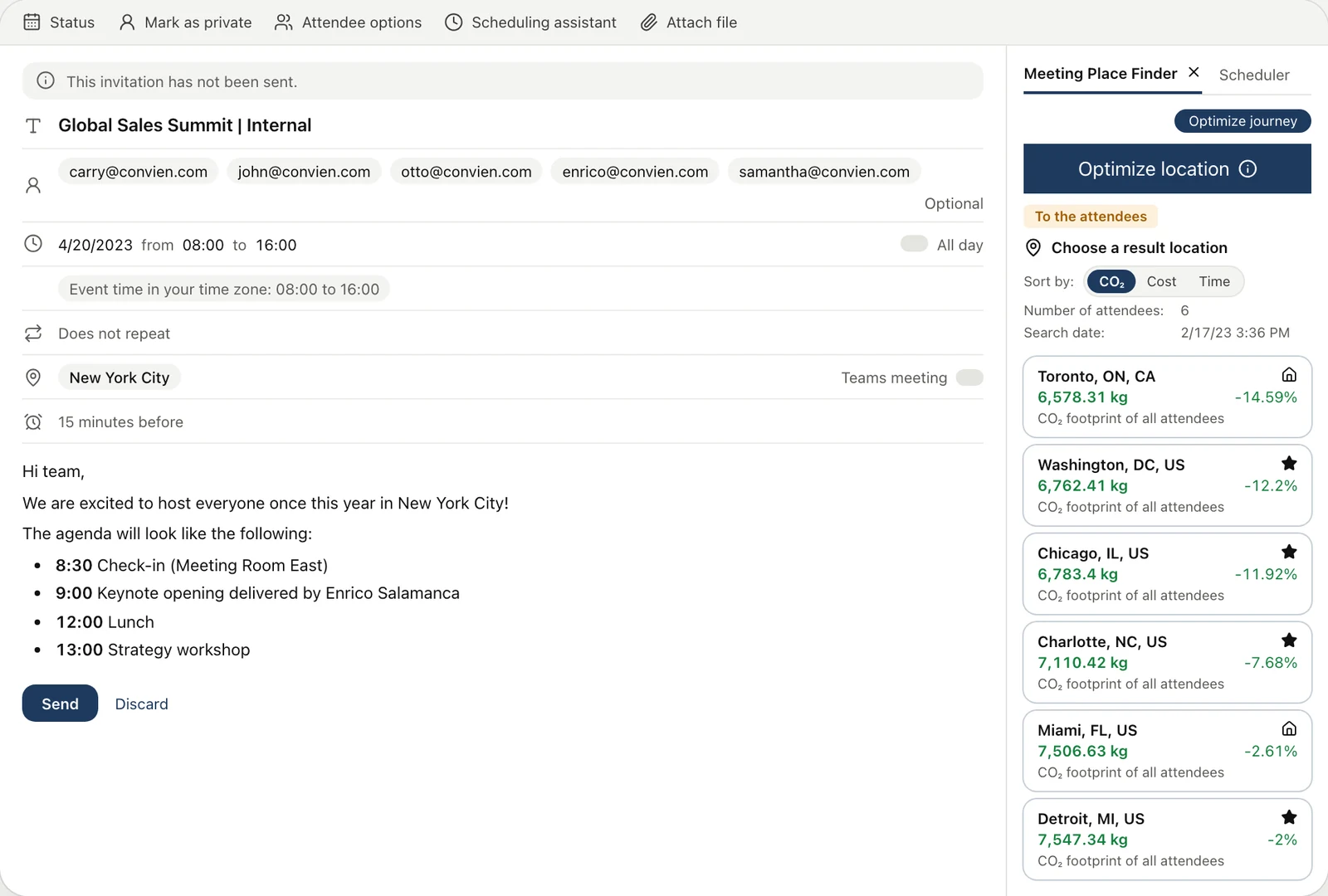
Add your attendees to an Outlook appointment as usual. The add-in ranks the best locations beside it, by cost, CO2 or travel time, and writes the address into the appointment.
Why the add-in
Where you already plan your meetings.
Free to install.
Get it from Microsoft AppSource. Calculations use credits.
Rolled out by your IT.
Your IT assigns it to users or groups in Microsoft Azure.
Ready in time.
The answer is ready before the invitation goes out.
How it works
From appointment to location.
1
Create the appointment
Add your required attendees in Outlook as usual. Optional attendees are not taken into account.
2
Find the best location
Open the add-in. It ranks the best locations for where your attendees start, by cost, CO2 or travel time.
3
Choose location
Click a result for its details. With “Choose location”, the address is written into the appointment.
FAQ
Questions about the add-in
More integrations
Convien in the tools you already use.
Let’s set up the add-in for your team.
Tell us how you plan your meetings. We show you the add-in and how your IT rolls it out.